Search

Loading

Wednesday, May 9, 2012

iOS 5 for iPhone, iPod touch and iPad Released for Download From ColomboZone


The most anticipated software update for iDevices, namely iPhone, iPod touch and iPad has been released at around 10 AM PST, October 12th, 2011, a date as promised by Apple. iOS 5 brings over 200 new features and enhanced functionalities to the iOS mobile devices, including the Notification Center, iMessage, iCloud support and PC Free, and it’s the prerequisite to enjoy iCloud.

iOS 5 Download
iOS 5 Upgrade
iOS 5 is now available for download and update directly through iTunes. There is no OTA (over the air) update yet. Only after upgrading to iOS 5 then the future update may be delivered via OTA.
To get the update now, connect iPhone, iPad or iPod touch to iTunes via USB, and click on “Check for Updates” in the device’s information screen.
iOS 5 is available for iPhone 4S, iPhone 4, iPhone 3GS, iPad 2, iPad, iPod touch (4th generation) and iPod touch (3rd generation).
iOS 5 Direct Download Links
What's New in iOS 5
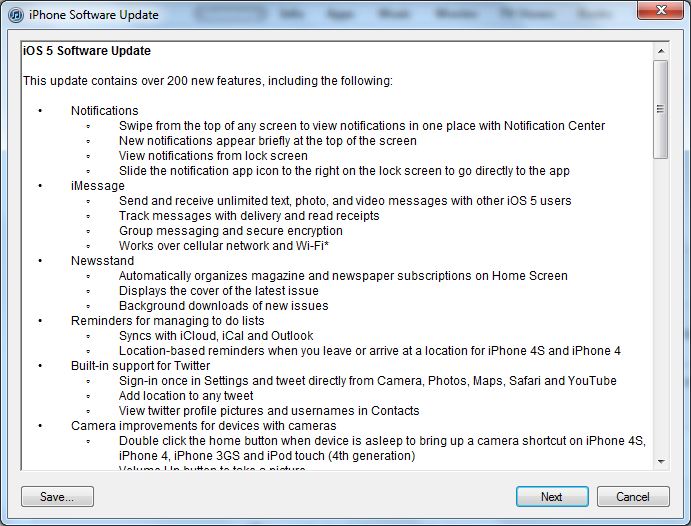
iOS 5 Software Update Changelog
  • Notifications
    • Swipe from the top of any screen to view notifications in one place with Notification Center
    • New notifications appear briefly at the top of the screen
    • View notifications from lock screen
    • Slide the notification app icon to the right on the lock screen to go directly to the app
  • iMessage
    • Send and receive unlimited text, photo, and video messages with other iOS 5 users
    • Track messages with delivery and read receipts
    • Group messaging and secure encryption
    • Works over cellular network and Wi-Fi
  • Newsstand
    • Automatically organizes magazine and newspaper subscriptions on Home Screen
    • Displays the cover of the latest issue
    • Background downloads of new issues
  • Reminders for managing to do lists
    • Syncs with iCloud, iCal and Outlook
    • Location-based reminders when you leave or arrive at a location for iPhone 4S and iPhone 4
  • Built-in support for Twitter
    • Sign-in once in Settings and tweet directly from Camera, Photos, Maps, Safari and YouTube
    • Add location to any tweet
    • View twitter profile pictures and usernames in Contacts
  • Camera improvements for devices with cameras
    • Double click the home button when device is asleep to bring up a camera shortcut on iPhone 4S, iPhone 4, iPhone 3GS and iPod touch (4th generation)
    • Volume Up button to take a picture
    • Optional grid lines to line up shots
    • Pinch to zoom in the preview screen
    • Swipe to camera roll from preview screen
    • Tap and hold to lock focus and exposure, iPad 2 and iPod touch (4th generation) only support exposure lock
  • Photo improvements for devices with cameras
    • Crop and rotate
    • Red eye removal
    • One tap enhance
    • Organize photos into albums
  • Mail improvements
    • Format text using bold, italic, or underlined fonts
    • Indentation control
    • Drag to rearrange names in address fields
    • Flag messages
    • Mass mark messages as flagged, read or unread
    • Customize mail alert sounds
    • S/MIME
  • Calendar improvements
    • Year view on iPad and new Week view for iPhone and iPod touch
    • Tap to create an event
    • View and add event attachments
  • Game Center improvements
    • Use personal photos for your Game Center account
    • Compare your overall achievement scores with your friends
    • Find new Game Center friends with friend recommendations and friends of friends
    • Discover new games with custom game recommendations
  • AirPlay Mirroring for iPad 2 and iPhone 4S
  • Multitasking Gestures for iPad
    • Use four or five fingers to pinch to the Home Screen
    • Swipe up to reveal the multitasking bar
    • Swipe left or right to switch between apps
  • On-device setup, activation and configuration with Setup Assistant
  • Software updates available over the air without tethering
    • iCloud support
    • iTunes in the Cloud
    • Photo Stream
    • Documents in the Cloud
    • Apps and Books automatic download and purchase history
    • Backup
    • Contacts, Calendar, and Mail
    • Find My iPhone
  • Redesigned Music app for iPad
  • Hourly weather forecast
  • Real-time stock quotes
  • Wireless sync to iTunes
  • Keyboard improvements
    • Split keyboard for iPad
    • Improved autocorrection accuracy
    • Improved Chinese and Japanese input
    • New Emoji keyboard
    • Personal dictionary for autocorrection
    • Optionally create keyboard short cuts for frequently used words
  • Accessibility improvements
    • Option to light LED flash on incoming calls and alerts for iPhone 4S and iPhone 4
    • Custom vibration patterns for incoming calls on iPhone
    • New interface for using iOS with mobility-impairment input devices
    • Option to speak a selection of text
    • Custom element labeling for VoiceOver
  • Exchange ActiveSync improvements
    • Wirelessly sync tasks
    • Mark messages as flagged, read or unread
    • Improved offline support
    • Save a new contact from a GAL service
  • More than 1,500 new developer APIs
  • Bug fixes


Read more »

HTC Rezound Combines 4.3″ True HD Screen with Beats Audio Technology

HTC Rezound photo
HTC and Verizon Wireless have officially announced the upcoming launch of cool new 4G LTE HTC Rezound Android-powered handset, which the companies claim as the only smartphone in the United States to integrate Beats Audio technology. Complemented with Mobile High Definition Link (MHL) connectivity and an included advanced Beats headphones that feature on-cable remote to let users enjoy their favorite music immensely.


HTC Rezound is initially based on Google Android 2.3 Gingerbread operating system. Anyway, for those who like to taste the latest Android OS on the Rezound phone, HTC has promised to roll out Google Android 4.0 (Ice Cream Sandwich) upgrade by early next year to deliver noticeably different user experience.
Key Features and Specs of HTC Rezound:
  • Large 4.3-inch multi-touch S-LCD with true HD 720p resolution (1280 x 720 pixels)
  • 8-megapixel AF camera (f/2.2, 28mm wide-angle lens) with dual LED flash and full HD video capture
  • Powerful 1.5 GHz Qualcomm dual-core processor plus 1GB DDR2 RAM
  • 4G Mobile Hotspot supports up to 10 Wi-Fi devices
  • Bluetooth 3.0 and Wi-Fi 802.11 b/g/n/a connectivity
  • Huge 16GB internal memory
  • Rechargeable 1,620 mAh lithium battery
  • Size: 5.08 x 2.58 x 0.54 inches
The new high-end HTC Rezound smartphone looks very sturdy and solid, and its 720p true HD display also works well for animation, picture with its super-high resolution and brilliant color, seems like the true iPhone 4S rival!

HTC Rezound which comes bundled with a stylish new, lightweight Beats headset and an 16GB microSD memory card is slated to be available through Verizon Wireless and Best Buy starting November 14 for $299.99, based on a new 2-year service agreement.
Watch the promo video of new groundbreaking HTC Rezound smartphone at below!


Read more »

Focus - The B-Boy Workshop Vol.1 (DVD-Rip) From ColomboZone

Focus - The B-Boy Workshop Vol.1 (DVD-Rip)
English | AVI | XVID 1576 kbps 25 fps | 720x416 | MP3 32 kbps 48 KHz | 1.99 GB
Genre: elearning

In this instructional video, the legendary B-Boy Focus explains and demonstrates how to do the fundamentals of B-Boying, including the relationship of the moves to the beat. Instructed by the legendary B-Boy Focus and world renowned drummer Ed Clery. The DVD features over 40 moves and variations through Top Rocks, Go Downs, Footworks, Freezes and Power. The classes aim to teach the importance of the relationship between the moves and the music so that new generations of bboys will learn its not the move, its the groove.
Focus - The B-Boy Workshop Vol.1 (DVD-Rip)


Download links:

Read more »

Wave In Head - Remixed (Limited Edition) (2012) From ColomboZone

Wave In Head - Remixed (Limited Edition) (2012)


Wave In Head - Remixed (Limited Edition) (2012)
VBR | MP3 | unmixed | 2012 | 01:15:35 | 143 Mb
Electronic, Synthpop | A Different Drum


Tracklist:

01 Highway 03:58
02 I Began To Hope (Acid Island Mix) 05:32
03 We Are The Scene (Remix) 04:22
04 Polygone (ReMX) 05:10
05 My Wandering Mind 04:59
06 Zeit Zu Leben (Maxi) 06:51
07 The Atom Of The Moment (Empire State Human Remix) 04:20
08 Progress (DJ Ram Evolution Mix) 06:13
09 For A Special Moment (Controlled Fusion Break Mix By Steffen Schurhrke) 05:20
10 To Hell And Back (Reaktor Rhythm Mix) 05:28
11 Im Traum (European Tour Remix By No Comment) 03:51
12 With You (Maxi) 04:48
13 I Began To Hope (WAVE IN Club Mix) 05:54
14 Yours By Night 05:20
15 Night Over Me 03:29


Read more »

FREE McAfee SiteAdvisor Live Download with 6 Months License Key From ColomboZone


FREE McAfee SiteAdvisor Live Download with 6 Months License Key .
▶ Now, easily know which links are safe and which are not on search engines, Facebook, Google+ and Twitter.
▶ Avoid entering into phishing websites and secure your computer.
▶ McAfee SiteAdvisor Live costs $19.99 for an year license to buy.
▶ Scroll down for detailed steps to get the license key.


Browsing is fun. We all love Internet and browsing on it.

When browsing – How many times have you ended up in a wrong phishing website which posed like a genuine one and lured you to visit it?

This would have happened a number of times to all of us.

That’s true, there are many phishing websites on the Internet that simply grab our attention towards it.
Once we visit such website, it tries to extract some personal information from us or tries to install a virus or malicious software on our computer.

The solution to this problem comes straight from the giant of the computer security field – McAfee.

With more than 23 years of experience and now being part of world’s largest chip maker Intel Corp, you could imagine the quality of their products and services.

McAfee SiteAdvisor Live is the solution to handle phishing problems.


McAfee SiteAdvisor Live
McAfee SiteAdvisor Live is a simple Windows tool that advices you about every web site you visit.

Originally developed by SiteAdvisor, Inc, an MIT startup, this awesome application was later acquired by McAfee.

The program installs a web browser plugin which provides you with simple red, yellow and green website safety ratings just like the traffic light system.

McAfee SiteAdvisor Live goes beyond safe searching and browsing to provide active, real-time, comprehensive protection from sites that can compromise your identity and your PC. Its automatic updates help protect you from even the latest threats.

It comes packed with various powerful features like advanced phishing protection, link checking in e-mails and instant messages, and a special ‘protected mode’ to disable interaction with dangerous sites.

Safety ratings from McAfee SiteAdvisor Live are based on automated safety tests of Websites and are enhanced by feedback from volunteer reviewers and insights from analysts.

When you search with Google, Yahoo! or MSN, the safety ratings appear next to search results.

If you are a social media addict then this software is a must for you as it can get color-coded risk ratings for links posted within Facebook, LinkedIn and Google+.

FREE McAfee SiteAdvisor Live Download with 6 Months License Key


Key Features
✔ Protects you from adware, spyware, spam, viruses, phishing sites and online scams.
✔ Advises you about the safety of sites using a colored button in your browser toolbar.
✔ Enhances your online search by placing safety ratings next to search results.
✔ Adds link safety checking to e-mail and instant messages, so you know which links are safe.
✔ Warns you about dangerous sites and search results with clear messages.
✔ Disables all interactions with dangerous sites with password-controlled ‘Protected Mode’.
✔ Informs you about the important information you need to know about a site´s downloads.
✔ Updates automatically to protect against new threats.


Screenshot
FREE McAfee SiteAdvisor Live Download with 6 Months License Key


How to get one for yourself ?

1>> Visit the promotional page here.

2>> Click on the button “6 Months Download Now”.

3>> A new webpage opens where you will need to fill in your details like first name, last name, email address and password as seen in the screenshot below.
(Users who already have a McAfee account can log in by clicking on “log in now”)

FREE McAfee SiteAdvisor Live Download with 6 Months License Key

4>> Go to your email inbox and activate your McAfee Account by clicking on the confirmation link. (If you used an already existing account, skip this step).

5>> Once you log in to your account, click on “Go to My Account” button.

6>> Now, click on “Download Now” button to start the download of the setup file which has buit-in 6 months license of Mcafee SiteAdvisor Live.

Note 1: If you get a message saying that – “You are not eligible for the free trial. You must subscribe in order to use the service.” , then I suggest you to register for a new McAfee account using a new email address and follow the same steps as above.

Note 2: You can instead download McAfee SiteAdvisor (Basic) which is free for lifetime.

Installation: is simple like installing any other Windows security software. Just follow the on-screen instructions to install it.

OS Compatibility :McAfee SiteAdvisor Live is fully compatible on Windows XP, Vista and 7 (both 32 & 64 bit).


Read more »

VA - Seamless Sessions Best of Funky House Anthems, Vol. 2 (2011) From ColomboZone

VA - Seamless Sessions Best of Funky House Anthems, Vol. 2 (2011)


VA - Seamless Sessions Best of Funky House Anthems, Vol. 2 (2011)
320 kbps | MP3 | unmixed | 2011 | 02:47:20 | 403.11 Mb
House, Deep House, Chill House | Meerkat Music Ltd


Tracklist:

01. Get On Up - DJ Bhokero, DJ Dey & Tasita D'Mour
02. Crazy 4 U (feat. Madeleine Kate) [Rhythm Slaves Mix] - Autosoul
03. Sounds Of Love (feat. Chappell) [Soularis Mix] - Distant People
04. Amor (feat. Johanna Olarte) [Jonny Montana & Craig Stewart Mix] - Jazzloungerz
05. Closer - Soularis
06. Animal ft Rudy Love & Gretchen Rhodes (Original Vocal Mix) - HawaBiza Project
07. Feel Good Muzik ft Mina Jackson (Souldynamic Vocal Mix) - Groove Assassin
08. My Destination (M-Sol Mix) - Justin Michael, Maiya & Phonic Funk
09. Loveblind (feat. Lu Chase) [Central Avenue Mix] - Headtrip
10. Love Thing ft Rob Burns (Jay-J Shifted Up Mix) - Moses Mclean
11. The Making of You ft Robert Owens (Tucci & Sahara Mix) - Canard & Soneec
12. Holdin' On (Oscar P & Davidson Ospina Vocal) - Daisy & Physics
13. Seamless Sessions Best of Funky House Anthems Volume 2 mixed by Ben Sowton (Continuous mix) - Ben Sowton


Links Are Interchangable. Thanks For Download !!!


Read more »

Remote Desktop – How much do you know about it ? & Download From ColomboZone


▶ Remote Desktop – How much do you know about it ?
▶ Remote Desktop allows you to access a computer at some other location with ease.
▶ Techinline Remote Desktop enables users to view, diagnose, and, if needed, take full control to resolve any problems on a remote computer which can be located at any point of the world.


What is Remote Desktop?
Remote desktop is an application that allows you to sit at one computer and connect to another remote computer present in a different location in any part of the world.

A good example of this is – You can connect to your work computer from your home computer and have access to all of your programs, files, and network resources as though you were in front of your computer at work.


When will you need it?
As soon as your friends and relatives find out that you know a bit about computers, it’s all over.

They’ll be asking you for help with the most varied tech issues. Here you can use a remote desktop to gain access to the desktops of your friends, relatives or even customers and then easily help them.

Or sometimes when you might need to access your home computer from work place, even if it is only to access a few files.


Tech inline Remote Desktop
Techinline Remote Desktop is an easy-to-use windows utility that enables users to remotely connect to a computer, view its desktop and operate it as if it was their own.

Since its market introduction in 2006, Techinline Remote Desktop has evolved into one of the leading solutions for remote connectivity and online collaboration.

Solving issues right from the comfort of your home/office has never been easier.

The wide range of available functions can be used not only to provide effective technical support across any distance, but also conduct online presentations, remote training sessions, and much more.

The applicability of Techinline is limited only by your imagination!


How to use Techinline Remote Desktop?
The entire connection process is as simple as it gets!

Only a browser and an internet connection are required to launch a remote support session between any two computers.

Log into your account online to start the support session, then direct your customer to techinline.net in order to obtain a 6-digit Client ID number.

Enter this number into the corresponding field on your end to instantly start resolving any technical issues on the remote desktop.


Key Features
✔ Easy Customization and Integration of the tool.
✔ 2-Way Desktop Sharing.
✔ Remote Reboot and Reconnect.
✔ Easy Browser-Based Solution.
✔ A comprehensive Reporting Tool.
✔ Connect behind Firewall/Proxy server.
✔ Auto Scroll and Auto Scale.
✔ Instantly transfer Files and Clipboard content.
✔ Instant Messaging Chat.


Screen Shot


Read more »

Blogger Wordpress Gadgets Real Time Web Analytics Find us on Google+