Search

Loading

Thursday, March 1, 2012

Make Free Calls with Vonage Mobile


App of the Week – Make Free Calls with Vonage Mobile
The market for VOIP apps is certainly crowded. While Skype and Google Voice have already established themselves as great apps, it’s always good to see what else is out there. That’s why on this edition of App of the Week, I’m covering the new Vonage Mobile app available for both iOS and Android. It takes a little bit of what Google Voice does and a little bit of what Skype does to create a unique package with some interesting features that definitely make it worthy of a spot on your smartphone.
Platform Availability: iOS 4.0 and up. Android 2.1 and up.
Cost: Absolutely free! Download it here for iOS and here for Android.
iPhone Screenshot 1iPhone Screenshot 2
What it is: An app that tightly integrates with your phone’s address book to make free calls and send free texts to other Vonage Mobile app users, along with super cheap international calls/texts. And for a limited time, all calls to the U.S., Canada, and Puerto Rico are free!
How does it work: Install the Vonage Mobile app onto your phone. After firing it up, it will ask for your phone number and email address. You will receive a text giving you a number to verify your account. If you can’t receive SMS, you can opt for Vonage to call you as well. After setup, make calls/texts to your heart’s content!

Features: Cheap Rates – While Skype offers low rates on international calls, Vonage’s rates are 30% lower than Skype’s across the board. Don’t forget that all calls to the U.S., Canada, and Puerto Rico are also free for a limited time.
Integrated Address Book – Instead of having to manually enter in phone numbers/screen names in Skype, Vonage Mobile just uses your phone’s existing contacts, allowing you to check which of your contacts already has the Vonage Mobile app for free calls/texts. You can also quickly send invites to whomever you want to get the app so you can both share in the free calling fun!
The Competition: As mentioned above, there are two heavyweights in this category:
Skype – Free – iOS 4.0 or later, Android 2.1 or later – Download it here for iOS and here for Android
Google Voice – Free – iOS 4.0 or later, Android 2.1 or later – Download it here for iOS and here for Android
Why the Featured App is Best:  Skype is still indispensable for free video calls, but Vonage Mobile tops it when it comes to 1) cheaper rates and 2) much better address book integration. Meanwhile, Vonage Mobile outdoes Google Voice with free calls/texts between fellow app users, along with a dead-simple way to invite friends to download the app.
Summary: Though it’s not the end-all be-all in VOIP apps, Vonage Mobile has some very strong features that make it better than Skype/Google Voice in some respects. While it doesn’t replace those two great apps, it’s definitely worth a download as a free calling app whenever you want to avoid using your minutes.
What do you think of Vonage Mobile? Let us know in the comments!

Read more »

How To Use Facebook Timeline For Brand Pages: New Feature Details


Screen shot 2012-02-29 at 11.48.50 AM
What does the launch of Facebook Timeline for Pages mean for your brand? Unprecedented control, an opportunity to boost engagement, but also lots of initial work. A host of new features became available this morning when Facebook gave all Pages around the globe the option to upgrade to the Timeline redesign. Here’s how they work, and how to use them to benefit your business.

Activating Timeline

First, visit the Timeline for Pages preview manager and select to add Timeline to your Pages. You’ll then enter a curation period where only your Page’s admins can see Timeline, while everyone else including your fans will see the old design. Walk yourself through the features detailed below, and when you’re ready, click the “Publish Now” button atop your Page to start showing off Timeline to everyone. You can upgrade anytime until March 30th, 2012, at which Timeline will automatically become publicly visible for all of your Pages.

Cover

The Timeline cover displays a giant 851 x 315 pixel banner across the top of your Page. Facebook’s Product Director of Ads Gokul Rajaram tells me its “goal is to symbolize what an organization is all about. For a restaurant it could be a popular menu item, a band could display album cover art, and a business could show a picture of their customers using their product.”
Covers may not display calls to action or references to Facebook features such as “Like this Page”, purchase or pricing info such as “40% off” or “Download at our website”, or contact information such as web address. Rajaram says “brands have been very positive [about the restrictions] because they don’t want to be seen as overly promotional — it’s a turnoff. Pick a visually stunning, high-resolution image that will delight or intrigue visitors and make them want to scroll down to your updates.

About Section

Below the Cover is your Page’s standard profile picture, name, and two stats: your total Likes and the number of “people talking about this”. The About section shows a description for brands or an address and contact info for local businesses. Users can click through the About link to unfold a map and view other basic info. Be sure to fill out a short, punchy description of your brand’s identity.

Page Apps

The redesign of how Page apps are displayed could be the primary disadvantage of Timeline for Pages. Apps have been relocated from the left navigation sidebar to the right side of the About section. While they appear with thumbnail photos instead of as text links, they’re overshadowed by the massive cover above. There are four app tiles above the fold, and the first is permanently occupied by Photos. The rest can include Likes, Videos, Events, Map and a Page’s custom apps.
Previously, Pages could set a default landing tab that all non-fans would first see instead of the wall when they visited a Page. This is no longer allowed. Instead, users always see the main Timeline view and have to actively click through to custom apps. This means custom apps for your contests, promotions, games, media, coupons, and signup widgets may receive much less engagement from users who find their way to your Page.
Pages also often used “Like-gates” on their default landing app, requiring users to Like a Page in exchange for the ability to use the app. While Like-gates are still permitted, they’re not nearly as powerful since they won’t be the first thing users see when they visit a page.
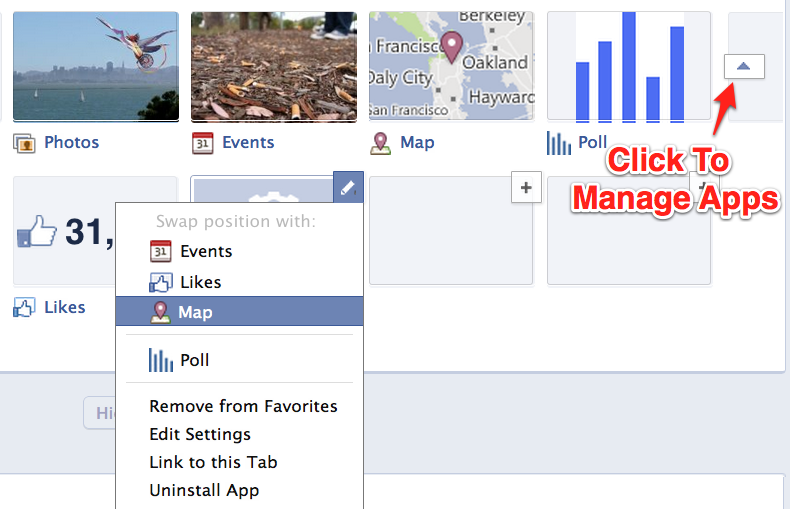
To edit which apps you display, click the drop-down icon to the right of the tiles, click the ‘+’ button to import your custom apps, and then hover over them and click the pencil to swap them around. I recommend putting the native or custom apps most crucial to your business above the fold, so coupons for ecommerce brands, contests for consumer packaged good companies, events for promoters, etc. Only display the Likes panel if you have a lot of them and want to peer pressure new visitors into Liking your Page.

Messages

By default, Page Timelines allow users to send direct, private messages to your Page. This creates a new customer service channel where you can address users’ concerns without having to discuss issues publicly on your Page’s wall / Timeline. Pages cannot proactively send messages, you can only respond to users that have already contacted you.
Since asynchronous customer service through messages is much cheaper than fielding live voice calls, Page messages could create additional ROI if you convince users to message instead of calling. If you find users complaining publicly on your wall, kindly ask them to message you instead and say you’ll resolve their problems there. You’ll need to consistently monitor and respond to messages though, or you’ll risk being perceived as ignoring your fans.

Highlights Feed

When users visit your Page, they’ll see a mix of stories published by your Page itself, by their friends, and stories from other users that have received a lot of Likes, comments, and shares. This is much different than the dedicated Page-only and other users-only feeds from before Timeline. Users can opt to visit those dedicated feeds, though. A Timeline navigation bar on the left lets users jump to different years in a brand’s history.
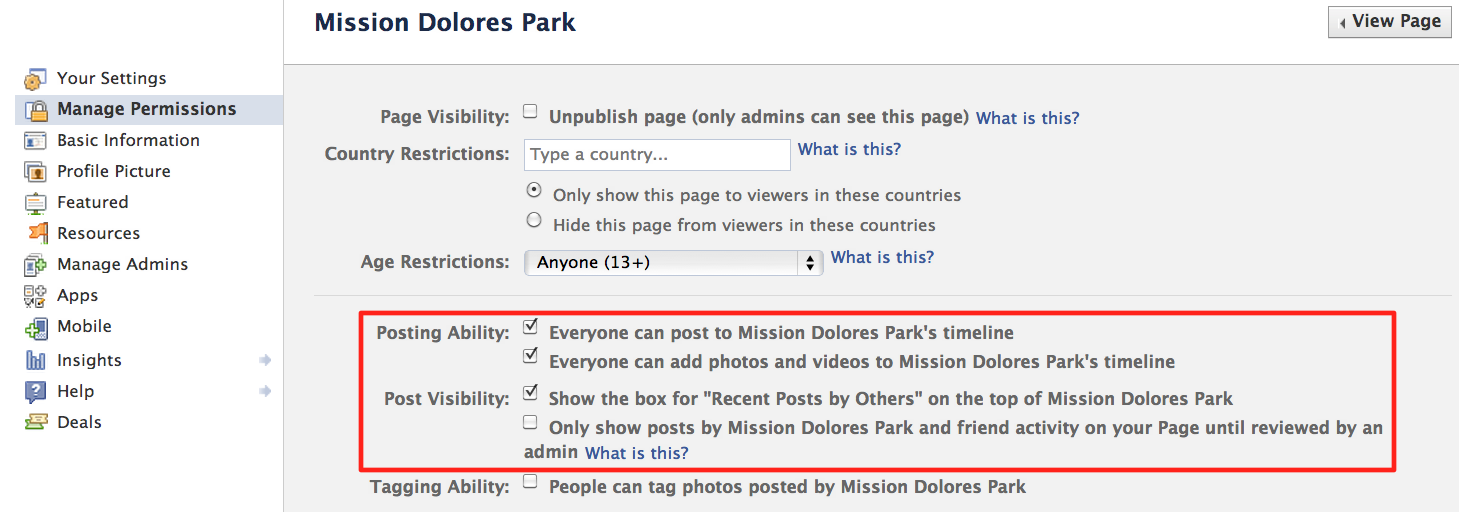
Since random user posts that aren’t necessarily positive could appear on Timeline, the Highlights feed presents branding risks. Thankfully, you can disable the ability for random users to post directly to your Page, and prevent their Timeline from displaying mentions of your Page. However, posts to or mentioning your Page by a visitor’s friends are always visible. If you see negative posts, hover over them and select to hide them, or delete them if they’re especially inflammatory or blatant trolling.

Pinned Posts

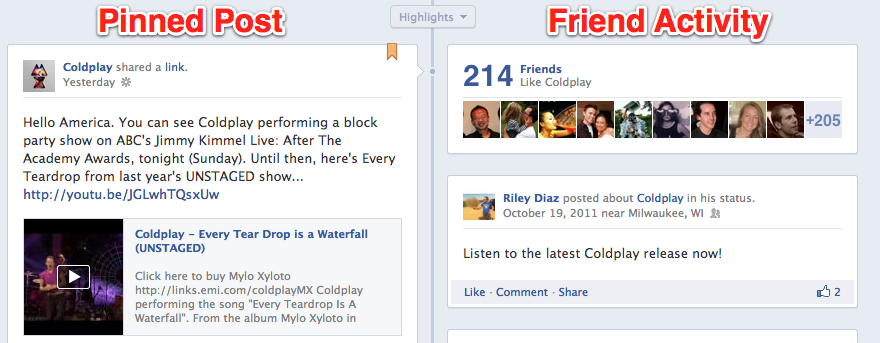
You can select to pin one of your best new or old posts to the top left spot of the Timeline feed for seven days at a time. Pinning can be used to direct users to an important promotional app, show off a special photo, or display a timely status update. The feature gives you significant control what visitors to a Page see first. Be sure to at least keep a link to your website pinned at all times, and rotate it with links to your apps and whatever else you want to drive the most traffic to or impressions of.
Beyond pinning posts, you can select to Highlight important posts throughout their Timeline to make them appear the full width of the Page. Ideally before you publish Timeline, or at least at some point you should crawl through your entire Timeline and Highlight all your best photos and links that are still relevant, and hide or delete posts that seem dumb or embarrassing in retrospect, have broken links, or were timely when published but no longer make sense. You should also Highlight user posts that especially positive, while hiding negative ones.

Friend Activity

In the top right of a Page’s Timeline’s feed, visitors see the count and faces of friends who Like your Page, followed by one update from a friend mentioning the Page that Facebook’s algorithms deem especially engaging. You have little control over this section. Keep it from amplifying negative mentions of your Page by hiding or deleting those posts when first published.

Composer

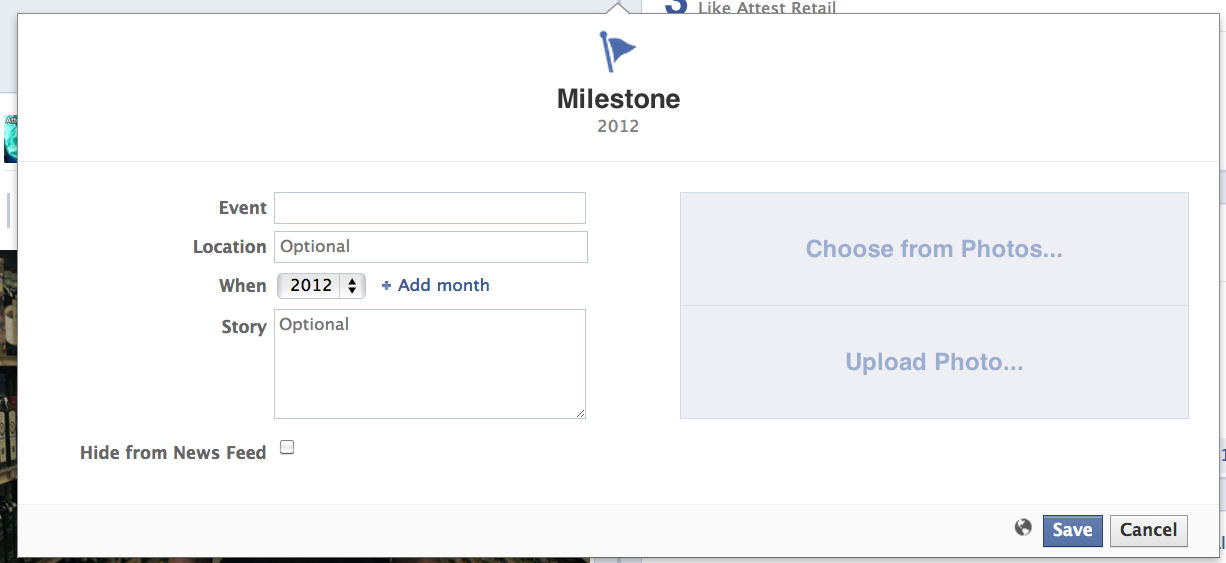
In addition to traditional status, photo, video, and question updates, you can select to publish special Milestone stories, such as your founding date, and other big accomplishments like acquisitions or hitting a notable number of customers. These updates are likely favored by the EdgeRank news feed visibility algorithm, and may receive more impressions in the news feed and more prominence on Timeline than standard posts. Milestones appear full-width on your Page with a special flag icon on top. Don’t be afraid to use them whenever somewhat appropriate. Users also see the standard composer, sans Milestones, and can use it to publish feedback publicly to your Page.

Admin Panel

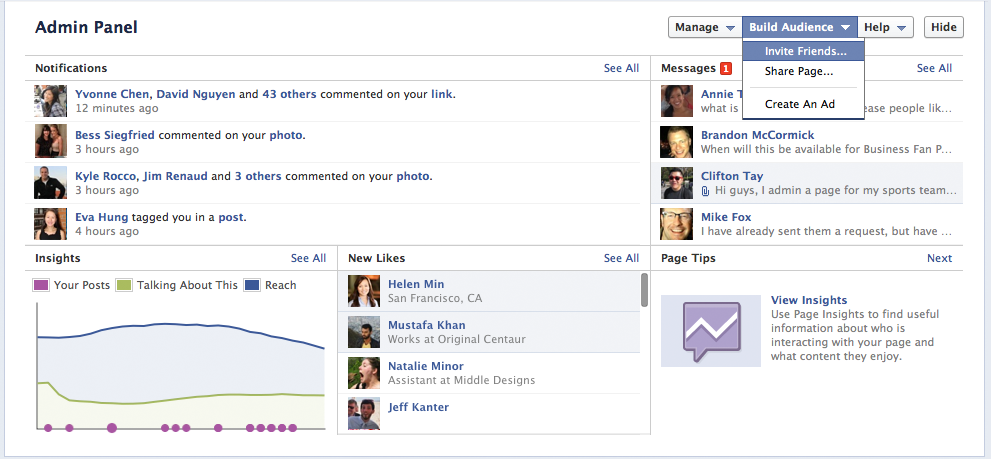
Rather than sending admins to a separate interface, the new Admin Panel drops down and appears overlaid over Timeline when clicked. It displays notifications of recent activity such as posts to your Timeline by fans, a list of your most recent Page Message conversations, new Likes, and a snapshot of your Insights data including the volume of your own posts, total reach, and the number of “people talking about this”. Each section can be drilled into for a more detailed look. A “Manage” button on the Admin Panel reveals the “Edit Page” option where you can configure all your Page’s settings including whether fans can post to your Timeline and who can see those posts.

Activity Log

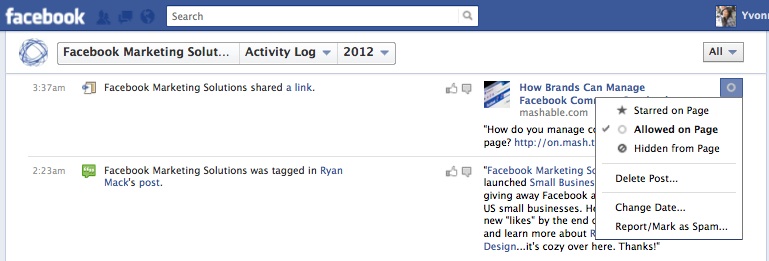
Here you can see every post your Page has ever published, as well as all those by users mentioning them. You can highlight posts to expand them to the full width of you Page, allow them to appear if Facebook deems them relevant, or hide them from view. Posts written directly on your Page’s Timeline may also be deleted. Activity Log makes it easy for you to curate your Timeline and make sure you’re putting your best foot forward.
In summary, here’s a checklist of the most important things to do with your Timeline
  • Choose a beautiful cover
  • Provide a punchy description
  • Feature your most important apps
  • Pin the post you want to drive the most traffic to
  • Highlight great historical posts by you and your fans
  • Hide or delete embarrassing, out of date, or negative posts by you and your fans

For more information, watch the Facebook Timeline for Pages intro video and read the product guide.

Read more »

Read this before you Download Windows 8


If you have been following all the good press around Windows 8 and are waiting to try it on your own computer, here’s the good news. The consumer preview version of Windows 7 (just a fancy name for beta software) is now available for download and it is very likely that your existing system specs are good enough to run Windows 8.
The System Requirements for Windows 8
According to the Windows 8 FAQ, any machine equipped with 1 GB of RAM, 16 GB of hard disk space and 1 GHz processor should be able to handle Windows 8. The minimum RAM requirements are 2 GB in case you would like to install the 64-bit version of Windows 8.
Should you download Windows 8 Setup or the ISO Image?
As you may have noticed on the Windows 8 download page, the installation of Windows 8 can be done in two ways.
  1. You can either take the easiest route and download the Windows 8 Setup program – that’s also the default option.
  2. Alternatively, you can download ISO Images of Windows 8.
If you are planning to install Windows 8 on your existing computer, either on a different partition (for dual-boot) or just want to overwrite your existing copy of Windows with Windows 8, the default Setup program is a good choice.
Please note that that your installed software program will only be preserved if you are upgrading from Windows 7 to Windows 8. If your planning to install Windows 8 on top of Windows XP or Vista, only the files will be preserved but not the various software programs that you may have on the disk.
The ISO image may be more handy in other situations like:
  1. Your computer has an x64 processor but is running the 32-bit version of Windows. If you want to install the 64-bit version of Windows 8, download the 64-bit ISO.
  2. You are a Mac user and want to install Windows 8 on your iMac / Macbook using the Bootcamp software.
  3. You want to install Windows 8 on multiple computers. Download the ISO, burn it to a DVD (or create a bootable USB Flash drive) using Imgburn and boot the other system using this disk.
  4. You want to run Windows 8 as a Virtual Machine inside your existing copy of Windows.
  5. You are running Windows XP.
The universal product key for Windows 8 is NF32V-Q9P3W-7DR7Y-JGWRW-JFCK8.
Will my software programs run inside Windows 8?
Before grabbing the ISO image of Windows 8, quickly run this setup utility and it will show a list of all software programs and hardware drivers on your system that are compatible with Windows 8. Else you can visit this page to see a list of all known software that are found to be working with Windows 7.
What route should you take?
You can have Windows 8 on your computer in three ways – you can install Windows 8 side-by-side (also known as dual-boot), as a virtual machine (so that it runs inside your existing Windows just like any other software) or Windows 8 can be your main OS (there’s no going back then).
If you just want to try out Windows 8  but without disturbing any of your existing set-up, the safest bet is to use a Virtual Machine. If you have a vacant partition or don’t mind creating one (it’s easy), go for the dual-boot option. Else, if you have a spare computer, you can consider overwriting it with Windows 8. Good luck!

Read more »

Art of Murder FBI Confidential @ Only By Colombo Zone (PC/ENG/2012)

 Art of Murder FBI Confidential @ Only By  Colombo Zone(PC/ENG/2012)

Art of Murder FBI Confidential @ Only By  Colombo Zone (PC/ENG/2012)
English | Platform: PC | Release: February 22, 2012 | Publisher: City Interactive | Developer: City Interactive | 1.08 GB
Genre: Adventure

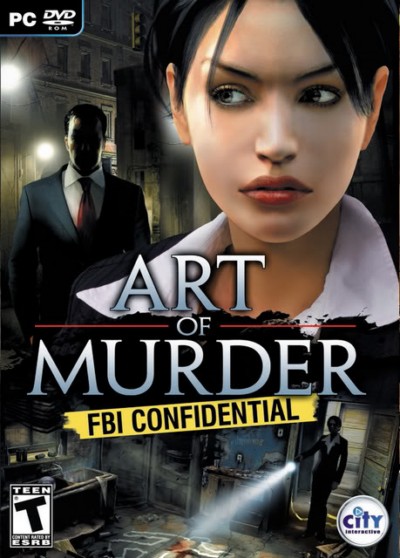
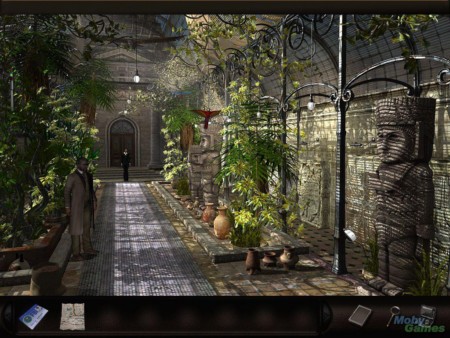
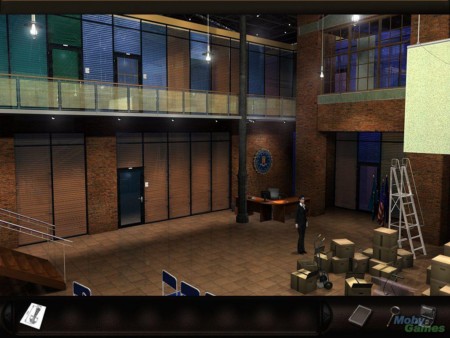
This is the story of young FBI agent Nicole Bonnet. Her first task is to solve a series of macabre murders where the victims are targeted as the wealthy and prominent of the community. The culpritâ?™s weaponry is rare and leaves an unusual calling card by removing the heart of those they choose. The adventure begins in New York, but the clues will lead ambitious agent Bonnet as far as the Peruvian city of Cusco -- the ancient capital of the Inca Empire, as well as on the border of the Amazon jungle.

Screenshots

 Art of Murder FBI Confidential @ Only By  Colombo Zone (PC/ENG/2012)
 Art of Murder FBI Confidential @ Only By  Colombo Zone (PC/ENG/2012)

Link Download


From Extabit
http://extabit.com/file/27a2gvb2f3a3w/Art of Murder FBI Confidential {PC Game} @ Only By THE RAIN.part1.rar
http://extabit.com/file/27a2gvb2jh4nw/Art of Murder FBI Confidential {PC Game} @ Only By THE RAIN.part2.rar
http://extabit.com/file/27a2gvb2jgc30/Art of Murder FBI Confidential {PC Game} @ Only By THE RAIN.part3.rar
http://extabit.com/file/27a2gvb2jgljw/Art of Murder FBI Confidential {PC Game} @ Only By THE RAIN.part4.rar
http://extabit.com/file/27a2gvb2f3a18/Art of Murder FBI Confidential {PC Game} @ Only By THE RAIN.part5.rar

Read more »

Fallout New Vegas Ultimate Edition (Full ISO/Action/2012) From ColomboZone


Fallout New Vegas Ultimate Edition (Full ISO/Action/2012)

Fallout New Vegas Ultimate Edition | 9.20 GB
Language: English
Publisher: Bethesda Softworks
Release: 02-29-2012
Genre: Action RPG, First Person Shooter

Welcome Back to New Vegas!
With the introduction of the Ultimate Edition, Bethesda Softworks offers you the chance to double-down and get the complete package of New Vegas fun. For the first time in one package, you can get all the Fallout: New Vegas content including the full suite of highly acclaimed add-on content: Dead Money, Honest Hearts, Old World Blues and Lonesome Road. To sweeten the pot, you’ll be armed with the latest cache of unique weapons, ammo types and recipes from the most recent add-on packs: Courier’s Stash and Gun Runners Arsenal. Whether you’re a seasoned explorer of the Mojave or playing the game for the first time, you’ll find there are more friends and enemies to make, more consequences to your actions and more opportunities to live in glory or infamy throughout the Wasteland. The choices you make will be as crucial to your survival as ever.

Beyond the Wasteland: The world of New Vegas is more expansive than ever. Each new distinct area presents a fresh set of branching-quests, remarkable personalities and more chances to play the Savior or the Pariah to the natives of New Vegas.

Shiny New Toys: Each add-on pack increases the mountain of armaments already at your disposal. Whether you’re an in-your-face brawler or a long-range gunner, weapons such as the Two-Step Goodbye (unique ballistic fists) or Sleepytime (a handy 10mm Sub-Machinegun) will give that warmonger in you a chance to flex your ammo-filled muscles.

Room to Grow: With each of the four main add-on packs, the maximum levelcap is increased by 5 levels, ultimately raising the ceiling to Level 50.

Including Such DLC's:
- Dead Money: Lured into a trap masquerading as the Sierra Madre Casino, you are thrown into a high stakes game where you’ll have to work with three other lost souls if you want to survive.

- Honest Hearts: An expedition into Utah’s Zion National Park goes horribly wrong and you become embroiled in a war between tribes and put into a conflict between a New Canaanite missionary and the mysterious Burning Man.

- Old World Blues: Transported to the Big MT research crater, you are enlisted by the Think Tank to save them from their own science experiments that have gone horribly out of control.

- Lonesome Road: Ulysses, the original Courier Six, contacts you and promises to answer why he refused to deliver the Platinum Chip at the start of Fallout: New Vegas, but only if you make one last journey into the treacherous canyons of the Divide.

Installation
1. Download and unrar release
2. Play the game! (cos it's a steam release)
Screenshot

Fallout New Vegas Ultimate Edition (Full ISO/Action/2012)

Fallout New Vegas Ultimate Edition (Full ISO/Action/2012)

Fallout New Vegas Ultimate Edition (Full ISO/Action/2012)

Links for download
(All below links are interchangable. No password)

Premium Recommend

http://turbobit.net/yz8ef07hlc66/FALLOUT.NV.UE.part01.rar.html
http://turbobit.net/o8qlt1zpz92u/FALLOUT.NV.UE.part02.rar.html
http://turbobit.net/4ewii7jgmwzq/FALLOUT.NV.UE.part03.rar.html
http://turbobit.net/tvfq15tni5zh/FALLOUT.NV.UE.part04.rar.html
http://turbobit.net/iif5gr4xp7up/FALLOUT.NV.UE.part05.rar.html
http://turbobit.net/v5zeh4j26uff/FALLOUT.NV.UE.part06.rar.html
http://turbobit.net/vpncyx5jed49/FALLOUT.NV.UE.part07.rar.html
http://turbobit.net/ry4xszm0r33w/FALLOUT.NV.UE.part08.rar.html
http://turbobit.net/39munu7uyy6x/FALLOUT.NV.UE.part09.rar.html
http://turbobit.net/54nq7d9e7o2h/FALLOUT.NV.UE.part10.rar.html

Read more »

Wednesday, February 29, 2012

Facebook Opens Timeline To All Biz Pages


Facebook Pages around the world can now upgrade to Timeline, allowing businesses to express themselves more visually through a redesign consistent with what was pushed to user profiles this fall. Major new features include the option to pin posts to the top of the feed for one week, and receive and respond to private messages from users, as well as add a big cover image and feature posts from amongst a feed of updates Facebook determines to be the most engaging.
Overall, Timeline should inspire users to spend more time browsing Pages and reading their feed stories. However, it removes the ability to set an app as a default landing page, which could reduce engagement with signup widgets and contests. All Pages can upgrade to Timeline today, and but also have an optional 30 day period to curate before Timeline is forcibly pushed to them on March 30th.
Here’s the Facebook video introduction to Timeline for Pages. The product guide for Timeline for Pages is also embedded below.
Existing Page APIs will remain intact. Facebook has been working with platform partners like Buddy Media and Vitrue to make sure their tools don’t break and can support the new functionality. A new admin panel and Activity Log lets Pages see a quick view of their Insights data, respond to inbound private messages, and feature, hide, or delete posts. Timeline for Pages is not visible from mobile yet, but will be soon.
Brands with a long, colorful history have the most to gain from Timeline. They’ll be able to insert updates, links, media, and milestones as far back as their founding. For example, Livestrong’s Page features photos and videos from Lance Armstrong’s fight with cancer in the 1990s, while ESPN displays a photo from its first broadcast in 1979.
The inventor of Timeline, Facebook product manager Sam Lessin, tells me that “We’re doing this because consistency matters. Organizations have identities too. A lot of brands aren’t great storytellers, but the best ones are. All brands should aspire to that level with their Timeline. It weaves together the best stories from the brand and the best stories from your friend about the brand.”
While businesses, organizations, and public figures should be excited about Timeline, their relationship with users will go largely unchanged. That’s because most interaction with them happens on the news feed, not Pages. The redesign does give marketers a more compelling place to link to where visitors will see more branding and less Facebook site chrome. By reducing the prominence of apps on Timeline, Facebook may have sacrificed the quantifiable benefits of Pages to increase their beauty. Still, the stunning visual design will further Facebook’s goal of replacing the company website as the center of a brand’s marketing efforts.
Here’s the Facebook Product guide for the Pages Timeline, which explains all of its features and some best practices for using it:

Facebook Timeline For Pages - Product Guide - From ColomboZone

Read more »

Hack Training Video Course 2 Discs From Colombo Zone


Hack Training Video Course 2 Discs
679 mb | eLearning

These Videos are for Educational Purposes ONLY!

Table of Contents:

CD1 Content:

Session 1
# Understand the Purpose of the Course and the Phases of Hacking
# Acquire the Hardware and Software for Your Laboratory
# Build the Windows? 2000/XP Hacker Tool Analysis Laboratory
# Build the Linux Hacker Tool Analysis Laboratory
# Test Your Laboratory and Keep It Secure

Session 2
# Understand Low-Tech and Computer-Based Reconnaissance
# Use Sam Spade to Gather Information About Target
# Search the Web for Interesting Target Information

Session 3
# Understand Scanning Techniques
# Search for Modems Using THC-Scan
# Develop a Network Map Using Cheops-ng
# Conduct a Port Scan Using Nmap
# Scan for Vulnerabilities Using Nessus

###### CD2 Content ######
Session 4
# Analyze Buffer Overflows
# Crack Passwords on Windows? and Linux
# Sniff Data from the Network Using Sniffit
# Use Netcat, the Swiss Army Knife? of Hacker Tools

### Session 5 ###
# Analyze an Application-Level Trojan Horse Backdoor (VNC)
# Analyze a Traditional RootKit (LRK4)
# Analyze a Kernel-Level RootKit (Kernel Intrusion System)

### Session 6 ###
# Understand File Hiding in Windows?
# Understand File Hiding in UNIX
# Analyze Protocol Tunneling Using Reverse WWW Shell
# Analyze Covert Channels Using Covert_TCP

Download Links: 3 files


Read more »

How To Hack WiFi.[Video Tutorial] From Colombo Zone


How To Hack WiFi.[Video Tutorial]

How To Hack WiFi.[Video Tutorial]
Size 141 MB | 3 Videos | Volume 1 | HD Videos | Video Tutorials

Screenshots

How To Hack WiFi.[Video Tutorial]

DOWNLOAD
(Click-able Download)


Read more »

LMFAO Video Premiere: Watch "Sorry for Party Rocking" Blow the Roof Off Right Now!

LMFAO returns—and they brought a crazy dancing zebra with them this time!
In this E! exclusive video premiere of "Sorry for Party Rocking," Redfoo and SkyBlu get their grumpy neighbors upset with their epic good times. And that altercation sets off a series of crazy party antics that bring out the authorities—and some kids who know how to play. Plus, this prequel-y movie set the record straight on some very important questions left over from the "Party Rock Anthem" video, such as: How did they end up in the hospital? What's with all the shufflin'? And hey, is that a zebra?!
So are you ready to have your mind blown? Check out this exclusive new video—and be forewarned that it's got grown-up language and situations—right now....


Read more »

CHRIS BROWN Singing with Rihanna in Orlando Nightclub


Chris Brown didn't shy away when the DJ blasted a Rihanna song at an Orlando nightclub this weekend -- instead, he proudly sang along with EVERY lyric ... and TMZ has the footage.

It all went down at Club Vain on Sunday night during an NBA All--Star weekend finale party.

Chris was hanging on the main stage ... with everybody looking at him ... when Rihanna's "We Found Love" began to pump through the speakers ... and Chris made sure everyone knew he's a HUGE fan of the song. 

It's the latest in what seems like a public reconciliation between the two sides -- earlier this month, the two collaborated on remixes of each other's songs. 

video platformvideo managementvideo solutionsvideo player

Read more »

Blogger Wordpress Gadgets Real Time Web Analytics Find us on Google+