Today, our online identities are fragmented across an array of usernames, email addresses, screen names, social media accounts, passwords, and on and on. We struggle to remember our login info and passwords, so oftentimes we use a few simple passwords that are easy to remember, or find ourselves turning to hints or inboxes to remember our forgotten permutations. Of course, this can cause cracks in our security armor, especially when it comes to online transactions, leaving us vulnerable to online thieves and no-goodniks.
Enter: OneID, a San Jose-based startup launching in beta today that is aiming to play a role in the next-generation of digital identity with a service that eliminates the need for multiple usernames and passwords. With OneID, users can securely log in to websites (across platforms), paying online with one single digital identity.
Many have gone after the single sign-on holy grail, but as of yet, all have been rebuffed, because no one wants to hand over all their sensitive personal information to one company. From the perspective of online businesses, OneID intends to reduce the friction, fraud, and costs associated with authentication and financial transactions, by way of a single login. The goal of which is to improve the experience for the business’ end-user by reducing transaction time. Today, the startup is making its developer release available, which, among other things, allows businesses to take advantage of single sign-on by adding just a few lines of code to their site. (Developers cancheck it out here.)
According to the OneID team, its service is made possible by a combination of asymmetric cryptography, the maturity of mobile hardware/software (and their ubiquity), as well as a distributed architecture that collectively reduces business’ vulnerability to sophisticated online threats by merging the security keys of several personal devices, then encrypted in an amorphous mass in a data center.
In short, it’s an all-out, world-changing infrastructure play, and although it’s got a steep hill to climb, the company will remain one to watch based on its leadership alone. The startup was founded by Steve Kirsch, a wealthy serial entrepreneur, who has founded six companies, including Mouse Systems, Frame Technology, Infoseek, Propel, Abaca, and OneID.
Beyond Infoseek, which Kirsch sold to for a reported $1.7 billion, he is one of the co-inventors of (and holds one of the original patents to) an early version of the optical mouse, which behind Kirsch’s vehicle Mouse Systems, helped bring the optical mouse to IBM PCs.
Along with engineers Jim Fenton, Adam Back, and Bobby Beckman, who co-created the technology behind OneID, Kirsch is going after the big fish: Integrating OneID’s technology into sites across the Web to let users create their own uniform digital identities, using the distributed software to both house payment information and for form-filling requirements.
As such, OneID’s identity software runs in four places — browsers, mobile devices, websites, and the cloud. Again, for businesses, this means reducing the IT costs inherent to authentication and financial transactions, like lost password recovery, chargebacks, liability from credit card theft, the need to store credit card information on their servers, and, thanks to speeding up sign in and check out shopping, reduces cart abandonment.
And for consumers, their credit card and personal information is stored on their personal devices using OneID’s software, which means it won’t be exposed in the event of a central security breach. Users can also choose the level of security they want for each type of transaction, allowing them to balance security with convenience at their discretion.
Of course, many companies have barked up the next-gen secure identity software tree before, to no avail. However, OneID already has several companies lined up to integrate the identity and payment technology, among then Salsa Labs, which offers payment and marketing services for 2,000 nonprofits organizations.
“After evaluating OneID, we see that nonprofits and campaigns of all sizes can benefit from using the service as another way to protect their supporters, donors and members,” said Salsa Labs Co-founder and CEO Chris Lundberg. “The benefits that OneID brings, such as the ease of use for online users and unparalleled security for website owners, was more than enough incentive for us to roll out the service to the Salsa Network.”
All Activators For Windows 7 (11.03.2012) | 279 MB Letitbit & Vip-File
All Activators For Windows 7 - Presents you a new update, full of a collection of ways to activate Windows 7 - a unique collection for your Windows activation 7kak for ordinary users as well as for the Guru. All methods and programs are checked personally by the authors build a lot of time and they can safely recommend them to you. All methods of activation are tested after the "anti-piracy" KB971033 update, and activate SP1.
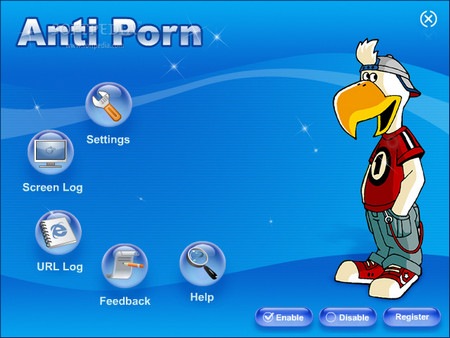
Anti-Porn - A powerful program for blocking viewing undesirable sites. Uninstall or disable can only know the password. The program has proved suitable for the leaders and fathers of families, because it is - the best solution for increasing productivity of staff, and parents will not worry that their child spends on the Internet while watching.
Key features: - Blocking porn sites - Anti-Porn block porn sites and thousands of words. You also mogzhete determine in advance the accuracy of filtering - Restricting the Internet - chat rooms - Anti-Porn can limit access to popular chat rooms and webcams. - Limit internet access by time - Full computer history log - Record traffic data for the survey of Internet use - You can make an inventory of computers for children, and find all the photos, movies, music files and web pages.
Anti-Porn parental control software can supply the globe standard time, you can set the program to let your kids use internet at certain times on specific days. Anti-Porn keeps a complete log of.
I am ready to share a little project around Gmail that I have been working on this weekend. The idea is that you can turn your Twitter Timeline into a Gmail Notifier and get notified (via tweets) as soon as new email messages arrive in your mailbox.
And since you can link Twitter to your phone number, you can even get SMS text alerts for new Gmail messages on your mobile phone with the help of Twitter. There’s no programming required and you can be up and running in 5 minutes.
Connect Gmail and Twitter through Google Docs
Gmail provide an RSS feed of your mailbox but the big problem is that if you have to auto-publish this RSS feed to Twitter, you’ll have to supply your Google account credentials in plain text. That’s not done.
My solution (see source code) uses OAuth with Google Apps Script to link your Gmail and Twitter accounts so you don’t have to share your passwords with anyone. You have a Google Docs spreadsheet that monitors your Gmail mailbox in the background, say, every 5 minutes. As soon as it finds any new message(s) in your mailbox, it sends out a tweet using your own Twitter app. That’s the overall picture but here’s how you can implement it:
Step A: Create a new Twitter App for Gmail
Go to twitter.com/signup and create a new Twitter account for your Gmail Inbox – mine is called myGmailInbox.
Confirm your email address, then open the Twitter settings page and check the option “Protect My Tweets” and uncheck the option “Let others find me by my email address.” This is necessary because you don’t want search engines, or any other Twitter user, to see your Gmail tweets even if the tweets will only have the message subject.
Go to dev.twitter.com, sign-in using your new Twitter account and use the following values to create a New Twitter App. [Name=Gmail; Description=Gmail Bot; Website=http://goo.gl/ldAXX; Callback URL=https://spreadsheets.google.com/macros]
Make sure there are no empty spaces in the URL fields else Twitter may give an “Invalid URL format” warning. Accept the terms and conditions, fill in the CAPTCHA and submit the form to create your first Twitter application.
Next go to the Settings Tab of your Twitter Application and change the “Access” mode from “Read only” to “Read and Write” since we want to publish tweets from Google Docs.
Save the Settings, then switch to the tab that says OAuth Tool and make a note of the Consumer Key and the Consumer Secret Key.
Step B: Link Google Docs and Twitter
Go to Google Docs and make a copy of this spreadsheet in your own Docs account.
From Tools –> Script Editor, replace the values of TWITTER_CONSUMER_KEY and TWITTER_CONSUMER_SECRET with their actual values.
Go to Resources –> Current Script’s triggers and create a new Time-driven event for “sendTweet” that triggers every 5 minutes.
Save the trigger and then click Authorize (Grant Access) so that this script can automatically read your Gmail inbox at set intervals to check for new mails.
Go to Run –> SendTweet and it should display another “Authorization Required” message from Twitter. Click Authorize –> Authorize App to allow Google Apps Script publish tweets to your Twitter Gmail account.
Step C: Follow Gmail on Twitter
Log in to your old Twitter account and send a follow request to your new Gmail account on Twitter.
Log in to your new Gmail account and approve the “follow request.”
And we are done. You should now see tweets for new Gmail messages, as they arrive, in your main timeline.
Get SMS Alerts for New Gmail
Should you wish to receive SMS alerts on your mobile phone for new Gmail messages, just open the Twitter profile page of your Gmail bot and turn on Mobile Notifications. This will obviously work only if you have connected (and verified) your mobile phone with your main Twitter account.
One more thing. In the default setup, the Google Script watches your Gmail Inbox for all incoming mails and tweets as soon as it encounters any new messages in the mailbox.
If this results in too many tweets (or SMS text messages), you can specify a different Gmail search filter and thus receive notifications only for messages that you care about. You need to change the value of GMAIL_SEARCH_STRING in line #18.
The Sims 3: Deluxe Edition + The Sims Store Objects (build 5.0) (2009-2011/MULTI2/Repack by R.G. Catalyst) Updated 13/03/2012 Year: 2009-2011 | PC | Eng Rus | Developer: MAXIS \ The Sims Division | Publisher: Electronic Arts | 13 Gb Genre: God Sim \ Business \ Pets
Playing The Sims allows you to monitor and organize the lives of citizens SimCity in all its diversity. Create a computer character. Build him a house, decorate it with furniture, garden grow. Know your neighbors. Send a job, learn how to earn money. Build character. In short, make a man of him. By itself, of course, he and a finger does not hit. You will have to guide his every step, gradually raising it to a full-fledged member of society.
The Sims 3 Life without limits! In reality, each person is given only one life. But with the help of The Sims 3, this restriction can be removed! You decide - where, how and with whom to live, what to do than to decorate your home and develop. The Sims 3 - is a unique simulator of life, have, and multiply all the best from previous episodes of the legendary series. The third part is erasing borders and destroys convention! If before the whole world seems divided into separate enclosed areas, but now he is one and is huge. Imagine that many years you lived in a large, cozy, yet the house, then suddenly opened the door to the street. The Sims 3 offers you the city the next generation - a bright, beautiful and full of incredible surprises. Step into it, and virtual media shine!
The Sims 3: World Adventures Exotic trip In a big city has many interesting things, but no matter how much fun were fraught with its streets, sooner or later you will want to change the situation. How do I do? Nothing could be easier. «The Sims 3 World Adventures!" Is more than quench your thirst for new experiences, as an addition to the original The Sims 3 will open up your characters is huge, bright, lively world! Pack your bags and go on a journey. You will receive soaked in spirit and extraordinary culture of the East Chinese city of Shang Simla, a mysterious Egyptian Al-Simara to the ancient pyramids and surrounded by the smell of fine perfume french les Champs Sim. Wherever you go, will not be bored. Meet with the culture of other nations, sightseeing, learn new skills and perform non-trivial task. Your personal heroes happen to run fireworks, press the grapes for wine and practicing martial arts techniques. But be careful, because the exotic journey - it is always a risk! In the ancient tombs of travelers waiting for the trap, and the mummies are not welcome guests ...
The Sims 3: Directory - Modern Luxury A modern and trendy lifestyle of your characters Turn the home of his characters in a luxurious and stylish apartments. Change rooms will help you drastically expensive and high-tech items - for example, a computer model of the latest, modern living room furniture, fancy video game console! Refreshing the design of the house, go to the wardrobe. Enjoy a stylish and elegant character clothing. Let your players are keeping pace with the times and the requirements of the latest fashion, and «The Sims 3 Modern Luxury Products" will help them learn a new way of life!
Arrange furniture contemporary living room, study, game room and patio. Turn the home of his characters in a luxurious and stylish apartments with elegant sofas, elegant tables and abstract paintings. Enjoy wards novelties technology, including ultra-thin TVs, video game consoles and more. Refill your wardrobe evening dresses, classic suits and luxurious linens. A gift for an anniversary! A special set for the 10th anniversary include your favorite items from the game The Sims and The Sims 2: vibrokrovat with a heart-shaped pillows, electric guitar and an aquarium.
The Sims 3: Career Now, in the virtual world of The Sims 3, everyone can choose something for everyone and make a career in any field, perhaps realizing a cherished dream. Becoming a doctor, to save the lives of patients in the hospital or making home visits. As part of the fire brigade valiantly fight the fire element ... well, maybe at the same time destroy the house with an ax undesirable citizens. Choosing the profession of private detective, to solve crimes, interrogating witnesses, and even arranging surveillance of suspects. With the addition of "The Sims 3: Careers," you also will be available to a new town - Twinbrook
The Sims 3: Catalog - Fast Lane Make a gift to the virtual ward with a new directory "Fast Lane". When the pace of life rolls over, there's nothing better than a new car. Now, however, your characters can not just buy a wonderful four-wheeled friend, but also to become a real car enthusiasts. Build a great garage, decorate the house in an appropriate style, change your clothes - even the neighbors will die of envy.
The Sims 3: In the Twilight «The Sims 3 Late Night" will give players the opportunity to immerse your head in the nightlife of the city - visit the cool clubs, rubbing around celebrities and movie stars on the incendiary parties, sit in the bar after work and shake the audience's own performance group, splash in the jacuzzi and find out what lurking in the dark when the sun sets and dusk city streets adventures begin. Characters will be able to explore a new city center, where they get a chance to become a local celebrity, a bartender, the director of a movie or a music band. To get to the most elite clubs will have to try - to become famous in any activity or to find a way to get the list of invited guests. Otherwise, you will expose the club's bouncers heartless. If you attract new people, relax in the bar, arrange a party at a club or if you want thrills, find out a terrible secret - how to become a vampire. You can start a new and interesting career, paint the night city in a bloody color, or throw a party on a rooftop penthouse. Just depends on the players, what will happen in the history of The Sims 3, when dusk falls over the city.
The Sims 3: Products - Camping The holiday begins! Everything you need to spend time outdoors with style and all the amenities at your disposal in the catalog of The Sims 3: Camping. You can get the latest models of hot tub, summer kitchen with built-in grill, staffed with everything you need to practice cooking, roasting pan, and many other useful items! Choose one of the two new styles: "Garden Terrace" boasts elegant wrought-iron objects, and "Sunset on the Veranda" - decorated in warm and cozy colors. Dress up a new way: select a convenient costume for a picnic or an elegant dress for a romantic night under the stars.
The Sims 3: All ages Let your players live a full and fulfilling life! "The Sims 3 All Ages" gives your characters new holidays, new exciting events in the life and new opportunities to demonstrate their abilities! Let your players live a full and fulfilling life! From the beginning, you will find a world of children's fantasy, then - the tumultuous experiences of a teenager, and then - full of intricate relations between adult life. Evaluate the charm of each stage! New interests and activities of your characters will make life bright and full. "The Sims 3 All Ages" gives your characters new holidays, new exciting events in the life and new opportunities for their talents!
The Sims 3: Directory - City Life The catalog «Sims 3: City Life" features dozens of kinds of objects. New facilities and buildings will change the face of the city, and interior - design houses characters. Open a new smart library, an exclusive gym or cozy cafes, excellent build a playground; Organize the laundry in the house with a modern washing machine and large dryer. The catalog «Sims 3: City Life" is all that is needed in order to make life more comfortable characters, as well as significantly expand the list of interesting and enjoyable places for recreation and socializing.
The Sims 3: Pets For the first time in the history of the series of The Sims 3 players will be able not just to get a pet, but literally "get in their skin," taking control of pets in their hands. Looking at the world in terms of our younger brothers, players will learn a lot of curious and, of course, open up new secrets of the city and its inhabitants. Without a doubt, with «The Sims 3 Pets" Life in the virtual world will sparkle with new colors.
The Sims 3: Catalog - Elegant Bedroom Let the life of the characters sparkle with new colors! In January, The Sims 3 will get a new stunning catalog. Luxury furnishings for the bedroom and bathroom, plus a romantic lingerie - that will give your protege "The Sims 3 bedroom exquisite catalog." Create a unique nest, where it will be a romantic canopy bed, no less remarkable furniture and exquisite bath. Put the finishing touches: put a vase of flowers, candles and scatter rose petals - all help create the right mood. Is your character going on a romantic date or just want to spend a pleasant evening? The new intimate lingerie is designed for fun! Simple but elegant hairstyle will complement the look of the character and emphasize the desire for pleasant rest. "The Sims 3 bedroom Exquisite Catalog" will help you to be always prepared for any eventuality - a chance encounter, in the jacuzzi or enjoying a pleasant and relaxing at home.
The Sims 3: Show Business Become a true superstar with his character in the world of The Sims and tell all the story of the ascent to stardom! With the new social features, you can keep your friends informed of their progress and, of course, to watch other people's achievements. The singer, acrobat, magician or deejay - choose a path of heart and go for it! Speak to a variety of venues - in cozy clubs, concert halls and luxury on the huge stadiums. And try not to disappoint the audience: will like it - will become a star, no - it will languish in obscurity.
Features repack:
Nothing is converted to a lower bitrate Removed the cache core cities (now the game is creating itself (as for dop.gorodov) on the basis of the gameplay) Have all official amendments and directories, as of March 10, 2012 A complete set of official pack of additional content from the "Sims Store" as of March 10, 2012 (thanks TeMochkiN). Installation - optional. Four exclusive additional cities: Lunar Lakes, Hidden Springs, Riverview and Barnacle Bay As a part of The Sims Store unlocked premium content for The Sims 3: Show-Business (Katy Perry Edition + Origin pre-order) Game Version 1.31.118/2.17.2/3.13.1/4.10.1/5.8.1/6.5.1/7.3.2/8.0.152/9.0.73/10.0.06/11.0.84/12.0.273 Installation time ~ 20-25 minutes. Release R.G. Catalyst
Aside from going live in the company’s native Korea later today, users in Poland, Hungary, and Sweden will be among the first to get the long-awaited update via the Kies software manager. Rest assured that other markets will soon follow, though Samsung doesn’t get any more specific than that.
Well, after a bit of a false start, Samsung finally seems to have done it. According to a new blog post on the official Samsung Tomorrow blog, the Korean consumer electronics giant has finally begun to push their Ice Cream Sandwich update out to the Galaxy S IIs of the world.
And with that, Galaxy S II owners began once again to feel the love. Or at least, most of them did. The update in question is meant for international spec Galaxy S II (the GT-I9100), so State-side owners of a AT&T/T-Mobile Galaxy S II or a Sprint Epic 4G Touch won’t be joining in the official fun just yet.
In their official announcement, Samsung has also confirmed that the Ice Cream Sandwich update will “follow soon” for the Galaxy Note, Galaxy S II LTE, and the 8.9 and 10.1-inch Galaxy Tabs. On top of that, Samsung will soon push out new updates that bring features like Face Unlock and a revamped photo editor to devices like the Galaxy S (and its Super Clear LCD variant), Galaxy Tab 7, Galaxy S Plus, and the Galaxy W.
Though there’s no word yet on when any of these updates will hit, expect Samsung to mistakenly announce it on their Indonesian portal before pulling the post and telling people to watch their Twitter account for news instead.
To publish a “review” of the Lytro as it is today is, in a way, very premature. But it’s also only fair. The product is shipping and, to an extent, complete. But given the number of features and planned improvements in the pipes, a review today will be obsolete in a few months. Nevertheless, an initial judgment on the device must be made.
So here is what can be said of the Lytro in a form that can only really be called a public beta.
Pros
Camera is well-built and extremely easy to operate
Uniqueness of the imaging technique makes you think differently about photography
Could be good for kids
Cons
Image quality isn’t particularly good
Composition options are, in some ways, extremely limited
Many desirable ways to manage and adjust your photos are absent
A quick explanation is probably in order for people who have not handled the camera. The Lytro Light Field Camera lets you take pictures in which you can adjust the focus after the fact. It has two modes: everyday, in which you only control the zoom and shutter release, and creative, which lets you zoom more, focus closer, and control the depth of field more — but you have to manually tell it where to focus, which is kind of backwards for a device meant to remove the process of focusing from the equation.
The photos, or “living photos” as they call them, can then be transferred to your computer and uploaded to Lytro’s website, where you can then embed or share them elsewhere online.
We recently got to talk with Lytro founder Ren Ng and their director of photography, Eric Cheng, at an event in San Francisco. I cornered them for a few minutes to talk about the product and their plans for the future.
Hardware and design
The designers of the Lytro camera itself should be congratulated for creating a device that is unique, functional, and attractive all at once. That’s not easy to do. The square-prism shape is strange at first, being unlike almost any camera on the market, but once you think of it more as a kind of telescope than a camera as far as handling is concerned, it’s quite natural.
The shutter button is easy to find and pleasant to activate; the touch-sensitive zoom area is responsive; the textured rubber finish is grippy and attractive; overall the feeling of the device is one of solidity and simplicity. It’ll survive a fall or a splash of coffee and look good doing it.
My main criticism hardware-wise is the screen. It’s extremely small and the resolution (hence sharpness and ability to display your photos properly) is poor. It’s responsive to touch, but it can’t display much and getting the focus point right in creative mode can be a pain. It’s also difficult to tell how your pictures turned out in playback mode: the screen often just isn’t good enough to display the nuances of the focus shift. Many times I thought I’d captured a good one only to be disappointed, though sometimes I was pleasantly surprised with the opposite, as well.
One other minor potential concern is that the grid in the rubber might fill with grit and grime over time, but it’s hard to say for sure, only having had the camera for short while.
Shooting with the Lytro
Note: you can click on the pictures below to change the focus.
Creating multi-depth pictures is a totally new and interesting experience. The closest thing I can think of to how it feels is when I was using the Casio Exilim FC100 to shoot super-slow-motion video. Described on paper, both light field pictures and high framerates don’t really pique the imagination. But once you do it, you’re curious to find out how it would work in this or that situation, or from up here, or over here, and you begin to think differently about how the world around you can be captured.
The thing is that, as DP Review concisely puts it, this type of photography “tends to require contrived compositions.” Lytro’s primary strength is also its greatest weakness.
First it should be noted that the lens on the camera really isn’t very wide. They put it at ~36mm, but I found it had only a slightly wider field of view than my 1.6x crop DSLR with a 35mm lens – in other words, around 45mm, which is far from wide-angle. At all events, it could be wider. For composition with multiple subjects, which is really the only reason a picture should be taken with a Lytro camera and not a traditional one, you need as wide an angle as possible. A portrait lens means you’ll always be struggling to fit two subjects in the frame. And the square aspect ratio makes it harder still; you’d think you’d want a widescreen format so a foreground subject can be left or centered and the other subject off-center or opposed.
When shooting, you can be in either everyday or creative mode. In everyday mode, it is difficult to get the refocus effect without a specific kind of composition: very close to one object, with another distant object in the other part of the frame. In creative mode, you have much more latitude, and can do interesting things like shots with a long zoom (the constant f/2 lens helps with this) or super-macro stuff.
This last application, I have to say, is really astonishing — I was told that the device can essentially focus on things touching the lens, which is extraordinary and has produced some really interesting pictures almost effortlessly.
The catch with creative mode is that you can’t just fire away: you have to tap on the tiny screen to pick a region to “focus” on, and the resulting focus process is long and slow. You’ll want to use creative for action shots, but it’s impossible; you have to use everyday, and then you wish you’d just shot it with a normal camera.
As far as acting as a camera that simply requires no focusing, it certainly can do that, but the sharpness and image quality aren’t stellar, so you won’t want to print it big or anything like that. They’re experimenting with larger sensors and suggested that it may be possible to derive a larger static image from the raw light field data, but for now, the 1080×1080 image with questionable noise and sharpness levels is all you’re getting. Not that it’s really meant to be a replacement for a normal point and shoot camera, but one would hope it could at least fill that role.
The lack of tools to affect the photo after the fact is also frustrating. The Lytro software allows you to browse, rotate, and share, but that’s it right now. No adjustment of color or exposure, no expansion or contraction of the focus area, no cool effects that only a Lytro camera can do. This will change, but as it is, you’re very restricted in how you handle your images.
I do want to point out, though, that the simplicity of operation means that a child can use it, and it may actually be an interesting way for a young photographer to learn the rudiments of framing, depth of field, and so on. It’s hard to make a mistake in everyday mode, though the results probably won’t be breathtaking.
Despite the simplicity of the process, there’s still a learning curve to actually getting a photo right. As you can see, I was only partially successful.
Software and sharing
The Lytro software is limited to browsing your photos and grouping them into “stories,” and you can upload them directly to (and only to) Lytro, which will serve them for… eternity, you hope. Not much of a choice there.
Bafflingly, you can’t look at your photos in full resolution in the app; you’re limited to a half-size preview, fully interactive of course, but it’s only once you’ve uploaded them that you can see them in the full-size mode. A truly strange omission.
There is precious little information available about the picture for the interested shooter. You can’t see how many focal points will be preserved for the compressed web version, you can’t view a depth map or any metadata other than basic exposure info. Sharing online works fine, and interacting with the pictures is easy and can be fun.
Potential
I realize that this review may seem overly critical. That’s because I’m reviewing the product, not the technology. The technology is absolutely fascinating to me and some the potential applications (as verified with the device’s inventor, Ren Ng, and others) are mind-blowing. The problem is simply that none of the killer features is shipping with the camera. The primary usage scenario is limited to a certain type of framing and range, something a casual user will tire of quickly. And the extended usage scenarios forfeit the simplicity promised by the camera.
The stuff they have coming down the line over the rest of the year might make this camera a much more exciting proposition: control over depth of field, adjustment of color and exposure, a more versatile client app (and a Windows version), more ways to share your photos, 3D and perspective shifting… the list goes on.
But those features will be rolled out who knows when. Right now the camera is shipping, for $400, with a feature set that, aside from the initial blush of curiosity and experimentation, doesn’t really excite.
The fact is that the people who would be interested by the Lytro are already buying it in droves, with the faith that it will improve — and it will. But will a group of early adopters, even a fairly large one, give Lytro enough legitimacy to continue their improvements, maybe put out a new device? Right now the Lytro is kind of a hard sell. As a photographer, and as an evaluator of popular products, my doubts remain. The people at Lytro are extremely smart, the technology is truly fascinating, and the potential is off the charts. But as a debut, the Lytro camera is just too limited in its current form to recommend to anyone but an enthusiast with money to burn. A year from now it might be different.



 Many have gone after the single sign-on holy grail, but as of yet, all have been rebuffed, because no one wants to hand over all their sensitive personal information to one company.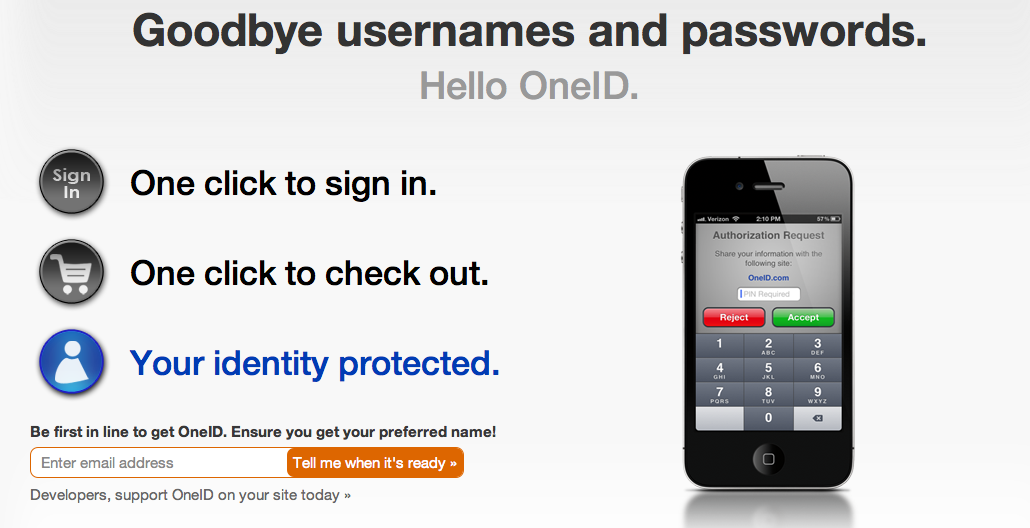




 Find us on Google+